

New Booking Engine
What you need to do next
Roller, our new golf booking engine, has gone live.
To help you with your existing membership, we’ve included guidance and short tutorials below so you can learn how to log in and make your bookings with ease.
To get started:
- In the top corner, click the drop down and select “Golf Log In.”
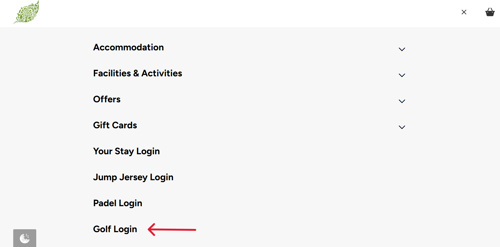
If you already have an account on Roller you just need to log in. You can watch a tutorial video here to learn how to do this.
If you don't already have an account, please select to 'create an account'. You must use the email address you used previously for golf.
2. Now that you've logged in, monthly members will need to add or update a payment method on their account. Monthly membership won't activate without completing this step. Take a look at the image below to see where you can add your details.
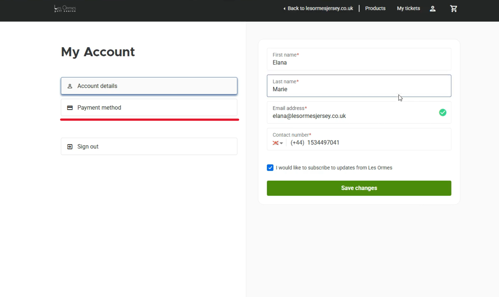
It's also important to note that monthly memberships are now automatically rolling. However, annual memberships will still need to be manually renewed after 12 months.
3. Once your membership is active, you can book golf as a member. If you need help, please watch the tutorial by clicking here.